I want to know whether agent frameworks share a structure. Each one draws an agent differently: as nodes and edges, as steps that pass events to one another, as a loop inside a function. To compare them, I first had to read one properly.
In this post, I look at the agentic flow in LangGraph, and ask two questions: where does an agent’s state live while it runs, and how does LangGraph decide what runs next? To answer them, we follow one small agent through a single run, step by step, and check what we see against LangGraph’s source code. The agent answers questions about a home power inverter from its manual. The complete code is a notebook in the axiom-ai-code repository, and it needs nothing more than an OpenAI API key to run.
I assume you have built an agent, or at least read the code of one. Where the LangGraph documentation already explains something well, I link to it rather than explain it again.
What is an agent?
There is no agreed definition, and the ones in use look at an agent from different sides.
Anthropic separates two kinds of system. In a workflow, models and tools follow code paths written in advance; in an agent, the model directs its own process and its own use of tools.1 OpenAI’s guide puts it in one line: agents are “systems that independently accomplish tasks on your behalf.”2 Google’s whitepaper describes an agent as an application that works toward a goal by observing the world and acting on it with the tools it has.3 Harrison Chase, who started LangChain, defines an agent as a system that “uses an LLM to decide the control flow of an application.”4
Framework documentation mostly look at how agents are built, and how they function. Pydantic AI describes an agent as a container for instructions, tools, an output type, dependencies and a model.5 Microsoft’s Agent Framework describes agents that process input with a model, call tools, and respond.6 Meta’s Llama Stack combines inference, memory, safety and tools.7
Most of these describe how an agent is built, or what it does. Here is mine:
An agent is a system capable of constrained decisions toward a goal, built from reusable skills and actions.
Why not just functions?
If an agent is built from functions, why not keep it as a well-organised set of Python functions? Is there a difference? The industry answers in several ways.
OpenAI’s guide recommends an agent for workflows that conventional automation has struggled with: decisions that need judgement, rules too complex to maintain, and tasks that depend on unstructured data such as documents and conversations.2
Anthropic recommends the simplest solution that works, adding complexity only when it improves the result. Workflows suit well-defined tasks that need predictability; agents suit work where flexibility and decisions made by the model are needed at scale.1
Microsoft’s documentation is direct: if a function can do the task, write the function instead of an agent. Its framework offers agents for autonomous tool use and planning, and graph-based workflows when you need explicit control over the order of execution.6
Dex Horthy’s 12-Factor Agents reports that most agents he has seen in production are deterministic code, with LLM steps placed at the points where they matter: “mostly just software.” He starts from the observation that software is a directed graph, and his twelfth factor asks for the agent to be a stateless reducer.8
Harrison Chase describes agency as a spectrum: a system is more agentic the more the model decides how it behaves. The more agentic an application is, in his view, the more it needs new tooling and infrastructure, which is what led LangChain to build LangGraph.4
This post looks at what that infrastructure does with one small agent.
One small agent
The agent answers questions about a home power inverter, the PureSine 900VA. It is a fictional model, with a manual made of two small Python dictionaries: one for specifications (rated capacity, battery, eco mode and UPS mode), and one for support (what the warning lights and beeps mean, and what to do about them). Two plain functions look up a topic in each.
The question we ask it needs both halves of the manual:
The overload buzzer went off this morning. What does that mean, and what is the maximum wattage load this model can actually handle?
What the buzzer means is in the support section. The maximum load is in the specifications.
The state is a TypedDict:
class InverterState(TypedDict):
    user_query: str
    next_action: str
    search_query: str
    findings: Annotated[list[str], operator.add]
    final_answer: str
Four keys are plain. One, findings, carries operator.add, which tells LangGraph how to combine updates to it. We will come back to what that means at runtime.
There are three nodes, and each is a plain Python function. LangGraph’s documentation puts the division of labour simply: “nodes do the work, edges tell what to do next.”9 There are no tool objects here and no prebuilt agent. A node receives the state and returns a dictionary of the keys it wants to update:
def support_node(state: InverterState) -> dict:
    result = lookup_support(state.get("search_query", ""))
    return {"findings": [result]}
analyze_and_decide is the only node that calls the model. It sends the question and the notes gathered so far, and the model replies with a structured decision: check the specifications, check support, or respond. With the first two, it also names a topic to look up. With the third, it writes the answer. specs_node and support_node look up the topic and return a note.
The graph puts them in a loop:
# 01-langgraph-state.ipynb (abridged)
workflow = StateGraph(InverterState)
workflow.add_node("analyze_and_decide", analyze_and_decide)
workflow.add_node("specs_node", specs_node)
workflow.add_node("support_node", support_node)

workflow.add_edge(START, "analyze_and_decide")
workflow.add_conditional_edges("analyze_and_decide", route_decision)
workflow.add_edge("specs_node", "analyze_and_decide")
workflow.add_edge("support_node", "analyze_and_decide")

app = workflow.compile(checkpointer=MemorySaver())
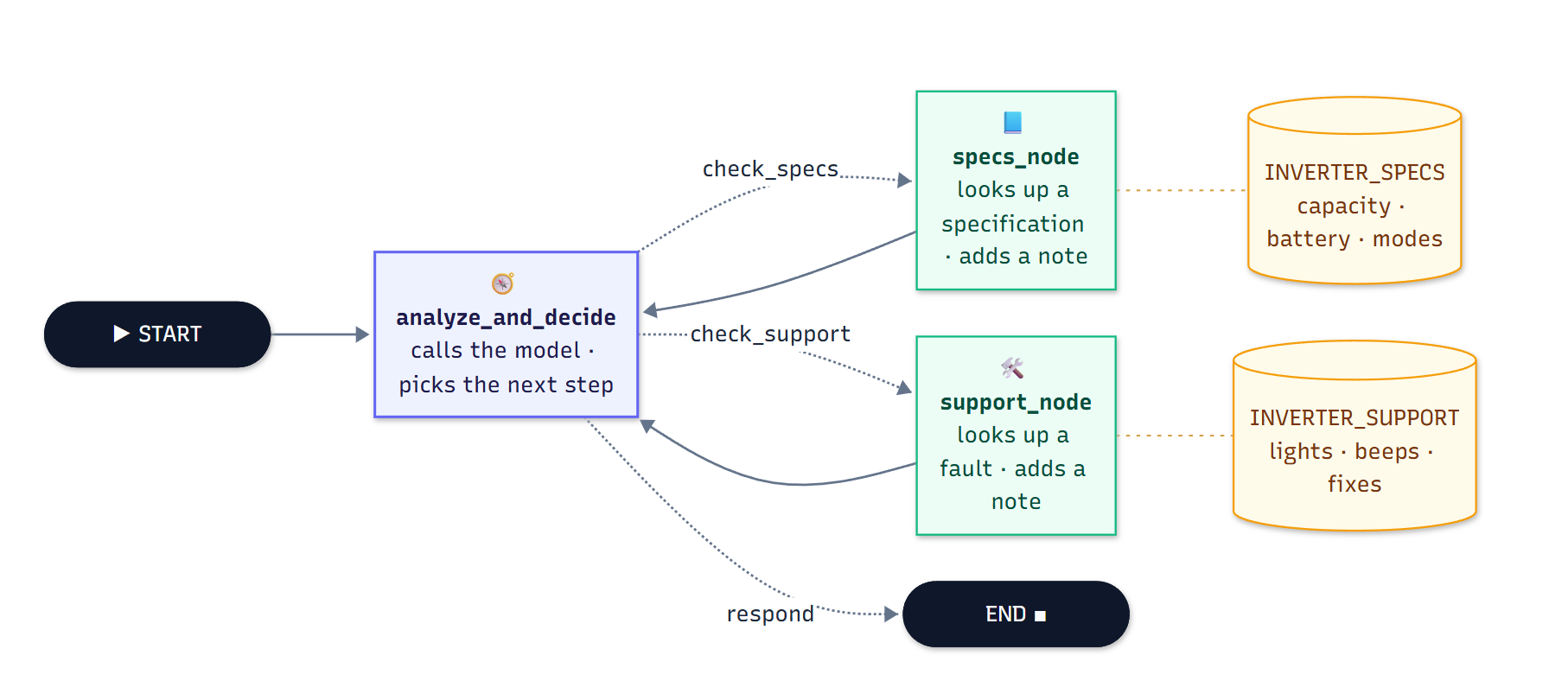
The inverter agent. Dashed edges are the model’s choice; solid edges are always taken. The notebook also draws the graph with LangGraph’s own renderer.
The decision node routes to one of the lookups, or to the end. Each lookup returns to the decision node, which sees the new note and decides again. It is the shape of a ReAct loop, where the model alternates between reasoning and acting,10 built from three functions.
The graph is compiled with an in-memory checkpointer, which saves the state at every step.11 That lets us read the whole run back afterwards.
The run
The model is OpenAI’s gpt-5.6-luna, at temperature 0. The run is not guaranteed to be deterministic, so yours may take a different path. This is the one in the notebook:
--- Final Response ---
The overload buzzer means the connected appliances are drawing more than the unit's
rated load. For the PureSine 900VA, the maximum supported load is 720 watts. Disconnect
one or more high-power appliances, then press the reset switch on the rear panel. The
red Overload LED should turn off.

--- Accumulated Notes in State (findings channel) ---
[1] Specification (model): PureSine 900VA
[2] No matching specification found. Available topics: model, rated_capacity, battery_support, eco_mode, ups_mode.
[3] Specification (rated_capacity): 720 Watts
[4] No matching troubleshooting entry found. Available topics: overload_alarm, low_water_indicator, battery_low.
[5] Troubleshooting (overload_alarm): Continuous buzzer sound and red Overload LED. The connected load exceeds 720W. Disconnect heavy appliances and press the reset switch on the rear panel.
The answer is right, and the path to it was not the shortest. The model’s first lookups were written in plain language, which the simple matcher doesn’t understand. The first note is only the model name, because the matcher found the word “model” inside the model’s long query. Each miss returned the list of available topics, and after that, the model used the exact keys. The lookup function’s own reply taught the model the manual’s vocabulary. And findings kept every note, misses included.
That is what came out. The rest of this post is about what happened inside the run: where each of these values lived while the agent ran, and how LangGraph decided, at every step, what to run next.
Where the state lives
compile() turns the StateGraph into a Pregel object, and its docstring describes the runtime in two words: actors and channels.[^src] The nodes are the actors. They don’t call each other, and they don’t share a dictionary. Each one reads from channels and writes to channels.
One channel per key
The channels exist before compile() runs. When StateGraph(InverterState) is constructed, it reads the schema’s type hints and passes each one to _get_channel, which checks in a fixed order:
# langgraph/graph/state.py (abridged)
def _get_channel(name, annotation, *, allow_managed=True):
    if manager := _is_field_managed_value(name, annotation):
        return manager
    elif channel := _is_field_channel(annotation):
        channel.key = name
        return channel
    elif channel := _is_field_binop(annotation):
        channel.key = name
        return channel
    fallback = LastValue(annotation)
    fallback.key = name
    return fallback
A managed value comes first, then a channel declared explicitly inside Annotated, then a reducer: a callable in the metadata that takes two positional arguments becomes a BinaryOperatorAggregate. Everything else falls back to LastValue. In InverterState, four keys become LastValue channels, and findings becomes a BinaryOperatorAggregate with operator.add.
The two kinds differ in one method, update. A LastValue holds one value. It accepts at most one write in a step, and raises InvalidUpdateError if it receives two. A BinaryOperatorAggregate folds each write into the value it already holds, using its operator.
That is why the run kept every note, misses included. Remove the annotation, and findings falls back to LastValue. The notebook tries this with two nodes in sequence, each writing one note:
Result in 'findings' channel:
['Note B: Water topped up with distilled water.']
The second write replaced the first. Nothing failed; the first note is simply gone.
A node reads every channel in its input that holds a value. A key that has never been written, like search_query before the model’s first decision, is absent from the node’s input rather than None, which is why the nodes read it with state.get().
Edges are channels too
When the graph is compiled, attach_node gives every node a trigger channel named branch:to:{node}, an EphemeralValue, and subscribes the node to it. add_edge("specs_node", "analyze_and_decide") does not create an edge object. It adds a writer to specs_node that writes to branch:to:analyze_and_decide. A conditional edge does the same, writing to the channel of whichever node the router returns. Even the input arrives through a channel: __start__, another EphemeralValue.
The compiled graph shows all of this directly. The notebook prints its channels, what triggers each node, and what specs_node writes besides its state update:
Channel                            Type
user_query                         LastValue
next_action                        LastValue
search_query                       LastValue
findings                           BinaryOperatorAggregate
final_answer                       LastValue
__start__                          EphemeralValue
branch:to:analyze_and_decide       EphemeralValue
branch:to:specs_node               EphemeralValue
branch:to:support_node             EphemeralValue

Node                   Triggered by
__start__              ['__start__']
analyze_and_decide     ['branch:to:analyze_and_decide']
specs_node             ['branch:to:specs_node']
support_node           ['branch:to:support_node']

specs_node writes to: ['branch:to:analyze_and_decide']
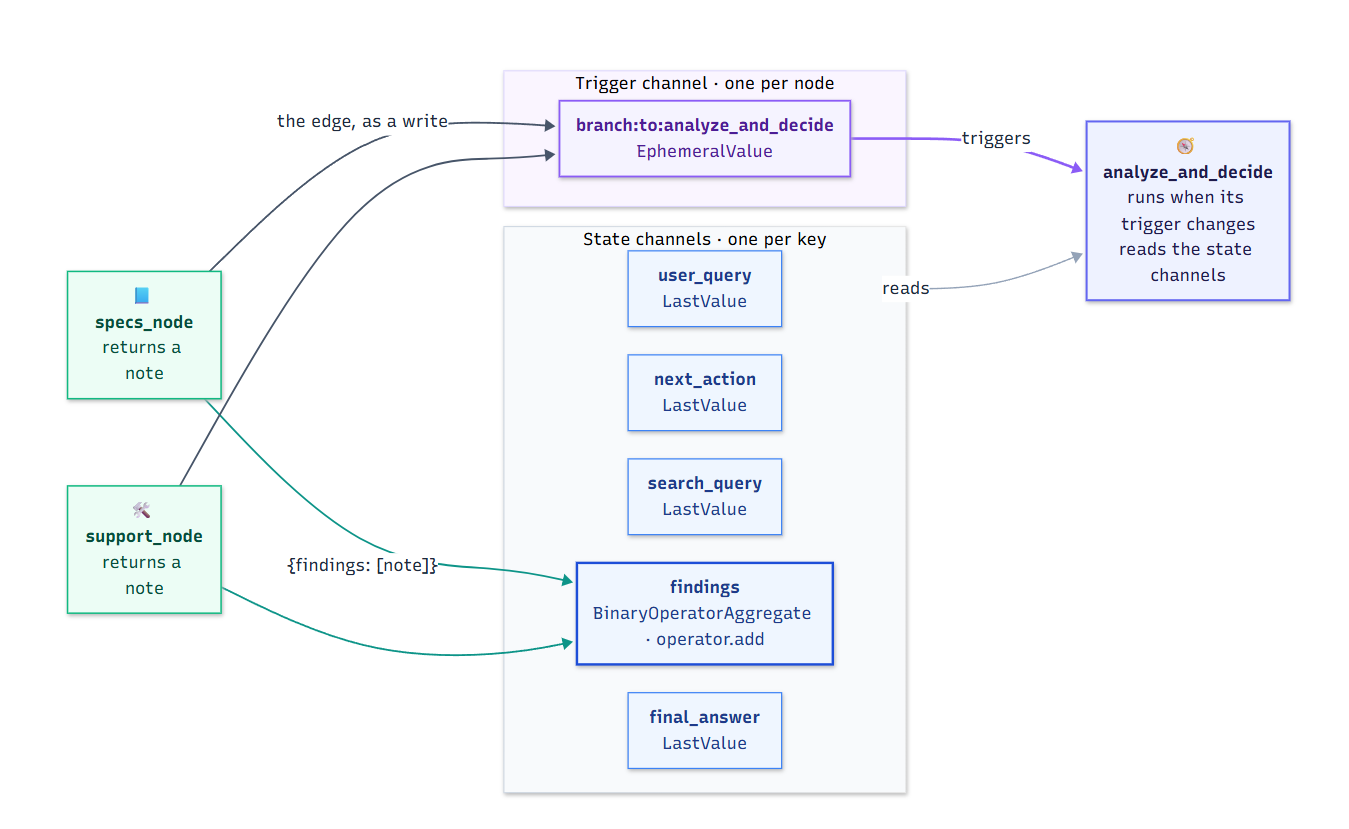
The edge from the lookups back to analyze_and_decide, after compile(). Its conditional edges work the same way, writing to branch:to:specs_node or branch:to:support_node.
One detail completes the picture. The routing function runs inside the analyze_and_decide task, before that step’s writes have reached the channels. It reads a copy of the state with only its own node’s writes applied (local_read with fresh=True), which is how it sees the next_action the model has just chosen.
After compilation there are no edges left, only channels and the nodes subscribed to them. In LangGraph, state and flow live in the same place. What remains is when a write reaches its channel, and that is the superstep.
One step at a time
LangGraph runs in supersteps, following the Bulk Synchronous Parallel model behind Google’s Pregel.1213 The Pregel docstring names the three phases of each step (plan, execution and update) and states the rule that matters most: during execution, a node’s writes to channels stay invisible to other nodes until the next step.[^src]
Plan. prepare_next_tasks chooses the nodes to run. A node is chosen when one of its trigger channels has a newer version than the one the node last saw. The checkpoint keeps both numbers: channel_versions for every channel, and versions_seen for every node.
Execute. Each task reads its input from the channels as the step begins, and writes into a buffer of its own. No task touches a channel while the step is running.
Update. When every task has finished, apply_writes applies their writes:
# langgraph/pregel/_algo.py, apply_writes (abridged)
tasks = sorted(tasks, key=lambda t: task_path_str(t.path[:3]))
...
for chan, vals in pending_writes_by_channel.items():
    if channels[chan].update(vals) and next_version is not None:
        checkpoint["channel_versions"][chan] = next_version
...
if bump_step:
    for chan in channels:
        if channels[chan].is_available() and chan not in updated_channels:
            channels[chan].update(EMPTY_SEQ)
The tasks are sorted by path, so writes are applied in the same order every time. The writes are grouped by channel, and each channel’s update runs once with all of them. Every other channel that holds a value is updated with an empty sequence. For an EphemeralValue, an empty update clears it, which is how a trigger channel fires exactly once. The channels that changed get a new version, and a checkpoint is saved before the next step begins.
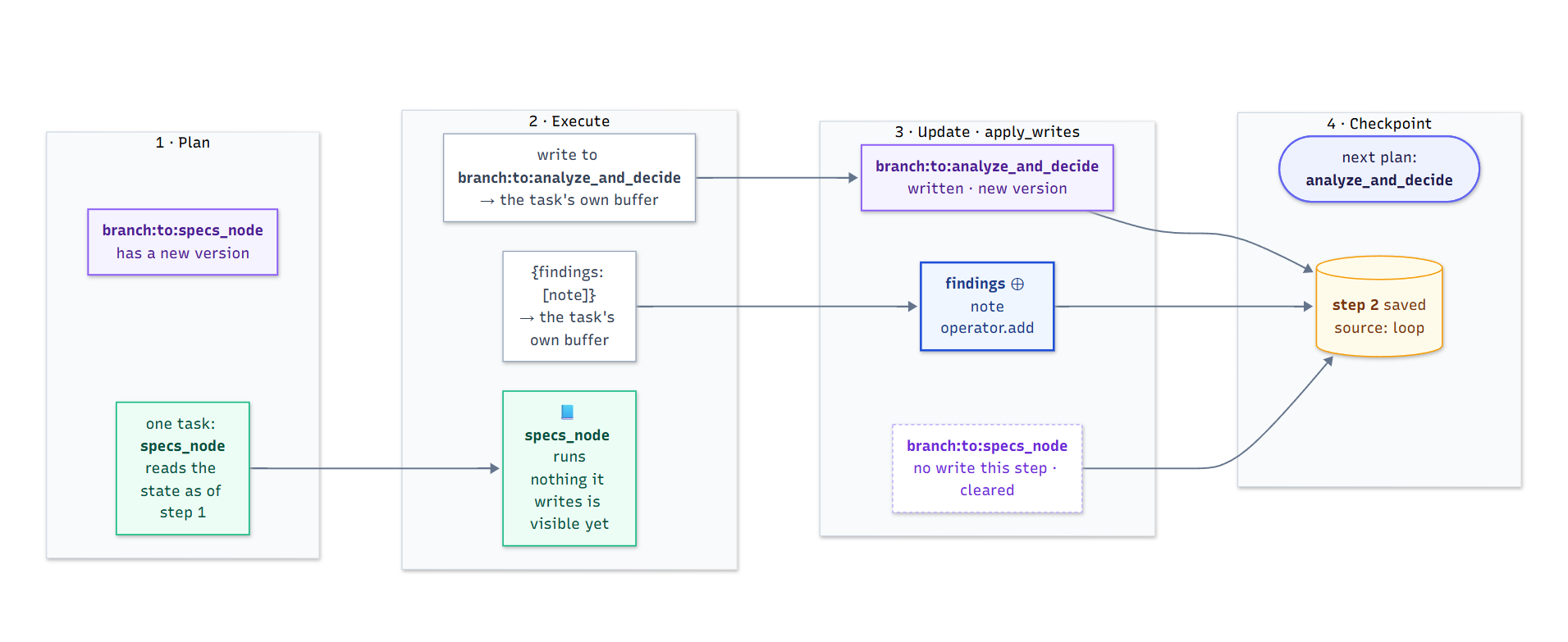
One superstep from the run: step 2, when specs_node ran. Its writes wait in its own buffer until apply_writes, and the trigger that started the step clears itself because nothing wrote to it.
The run, read back
The checkpointer saved a snapshot at every boundary, and get_state_history() returns them. Read from the oldest:
--- Step -1 (source: input) ---
  Next node scheduled : ('__start__',)
  State ['next_action']: none
  State ['search_query']: none
  Accumulated notes   : 0

--- Step 0 (source: loop) ---
  Next node scheduled : ('analyze_and_decide',)
  State ['next_action']: none
  State ['search_query']: none
  Accumulated notes   : 0

--- Step 1 (source: loop) ---
  Next node scheduled : ('specs_node',)
  State ['next_action']: check_specs
  State ['search_query']: overload buzzer meaning and maximum wattage load for this model
  Accumulated notes   : 0

--- Step 2 (source: loop) ---
  Next node scheduled : ('analyze_and_decide',)
  State ['next_action']: check_specs
  State ['search_query']: overload buzzer meaning and maximum wattage load for this model
  Accumulated notes   : 1

...

--- Step 11 (source: loop) ---
  Next node scheduled : ('(end)',)
  State ['next_action']: respond
  State ['search_query']: overload_alarm
  Accumulated notes   : 5
Step −1 is the input, saved before anything runs. Step 0 runs __start__, which copies the input into the state channels and writes the first trigger. From there, each lookup takes two steps: one for the decision, one for the lookup. Five lookups and a final answer make eleven steps after __start__, and thirteen checkpoints in all. “Next node scheduled” is the plan for the following step, read from the trigger channels that were just written. And between steps 1 and 2, search_query stays the same: specs_node didn’t write it, so the LastValue kept what it had.
The boundaries between steps are also where LangGraph can stop. interrupt_before is checked after planning and before execution, and interrupt_after after the checkpoint. Failure follows the same lines. Each task’s writes are saved as pending writes as soon as it finishes. If a task fails, the step’s update never runs, and on resume the saved writes of the tasks that succeeded are applied again, so only the failed task runs a second time. Each run is also bounded: it raises GraphRecursionError after recursion_limit steps, 10,007 by default in the version used here.
Two writes in one step
The inverter agent runs one node per step, so it never puts two writes into the same channel at once. The notebook forces it with two workers that start together and both write a plain status key:
worker_one ran
worker_two ran
Caught expected InvalidUpdateError from last_value.py:
At key 'status': Can receive only one value per step. Use an Annotated key to handle multiple values.
Neither worker failed; both ran. The error is raised afterwards, at the update, when LastValue.update receives two values. With Annotated[list[str], operator.add] on the same key, the step completes:
['Worker One completed', 'Worker Two completed']
The order doesn’t depend on which worker finished first, because apply_writes sorts the tasks by path before folding their writes. So a reducer does two jobs. Across steps, it keeps what earlier steps wrote, as findings did. Within a step, it merges writes that arrive together.
The same thread, again
The checkpoints belong to the thread_id. Invoke the graph again with the same configuration, and the run continues from the thread’s last checkpoint instead of starting empty:
Step  12 (input)  next: ('__start__',)            notes: 5
Step  13 (loop )  next: ('analyze_and_decide',)   notes: 5
Step  14 (loop )  next: ('(end)',)                notes: 5
The new input wrote only user_query. The five notes were already in findings, so the model answered in a single step, and the step count carried on from where the first run stopped.
What we understand so far
In LangGraph, an agent’s state is a set of channels, one per key, each with its own rule for combining writes. The flow is made of channels too: an edge is a write to the next node’s trigger. A run is a sequence of supersteps, and every write becomes visible at the end of its step, all together, in a fixed order. Reducers, conditional edges, checkpoints, interrupts and resuming after a failure are described on separate pages of the documentation. In the source, they all follow from that one arrangement.
Is this the shape of an agent, or the shape of LangGraph? The same agent can be drawn in other ways. LlamaIndex Workflows pass typed events between steps and keep shared state in a context object.14 pydantic-graph takes a node’s next step from the type its run method returns.15 Whether these drawings share a structure underneath is the question this series follows, and it stays open for now.
The next post builds the same inverter agent, with the same manual and the same question, in LlamaIndex Workflows, and starts from the question this one leaves behind: does LlamaIndex have a superstep?
You can check the outputs by running the notebook in axiom-ai-code.
Citations
Erik Schluntz and Barry Zhang (2024). Building effective agents. Anthropic. https://www.anthropic.com/engineering/building-effective-agents ↩︎ ↩︎
OpenAI (2025). A practical guide to building agents. https://cdn.openai.com/business-guides-and-resources/a-practical-guide-to-building-agents.pdf ↩︎ ↩︎
Julia Wiesinger, Patrick Marlow and Vladimir Vuskovic (2024). Agents. Google. https://www.kaggle.com/whitepaper-agents ↩︎
Harrison Chase (2024). What is an AI agent? LangChain blog. https://www.langchain.com/blog/what-is-an-agent ↩︎ ↩︎
Pydantic AI documentation. Agents. https://ai.pydantic.dev/agents/ ↩︎
Microsoft Learn. Microsoft Agent Framework: Overview. https://learn.microsoft.com/agent-framework/overview/ ↩︎ ↩︎
Meta. Llama Stack, documentation on agents. https://github.com/meta-llama/llama-stack ↩︎
Dex Horthy (2025). 12-Factor Agents. HumanLayer. https://github.com/humanlayer/12-factor-agents ↩︎
LangGraph documentation. Graph API overview. https://docs.langchain.com/oss/python/langgraph/graph-api ↩︎
Shunyu Yao et al. (2023). ReAct: Synergizing Reasoning and Acting in Language Models. ICLR 2023. https://arxiv.org/abs/2210.03629 ↩︎
LangGraph documentation. Persistence. https://docs.langchain.com/oss/python/langgraph/persistence ↩︎
Leslie G. Valiant (1990). A Bridging Model for Parallel Computation. Communications of the ACM 33(8). ↩︎
Grzegorz Malewicz et al. (2010). Pregel: A System for Large-Scale Graph Processing. SIGMOD 2010. ↩︎
LlamaIndex (2024). Introducing workflows beta. https://llamaindex.ai/blog/introducing-workflows-beta-a-new-way-to-create-complex-ai-applications-with-llamaindex ↩︎
pydantic-graph documentation. https://ai.pydantic.dev/graph ↩︎